Billing for client based businesses

Billing for client based businesses

Get Paid Faster.
Without Chasing Clients.

Create invoices, automate follow-ups, and keep every payment in view from one focused workspace.

Create invoices, automate follow-ups, and keep every payment in view from one focused workspace.

Billing gets messy after the work is done.

Billing gets messy after the work is done.

Billing gets messy after the work is done.

Scattered tools and manual follow ups turn simple billing into busywork.

Scattered tools and manual follow ups turn simple billing into busywork.

Scattered tools and manual follow ups turn simple billing into busywork.

01

Scattered billing

Invoices and payment activity spread across different tools.

02

Manual follow-ups

The same reminders, written and sent again.

03

Limited visibility

No clear view of what’s paid, due, or overdue.

From invoice sent to payment received.

Keep billing moving without stitching together separate tools and manual follow-ups.

Keep billing moving without stitching together separate tools and manual follow-ups.

From invoice sent to payment received.

Create & Send

Create polished invoices and send them fast.

Track Payments

See what’s paid, due, overdue, or outstanding.

Automate Follow-ups

Let reminders handle the chasing.

Create & Send

Create polished invoices and send them fast.

Track Payments

See what’s paid, due, overdue, or outstanding.

Create & Send

Create polished invoices and send them fast.

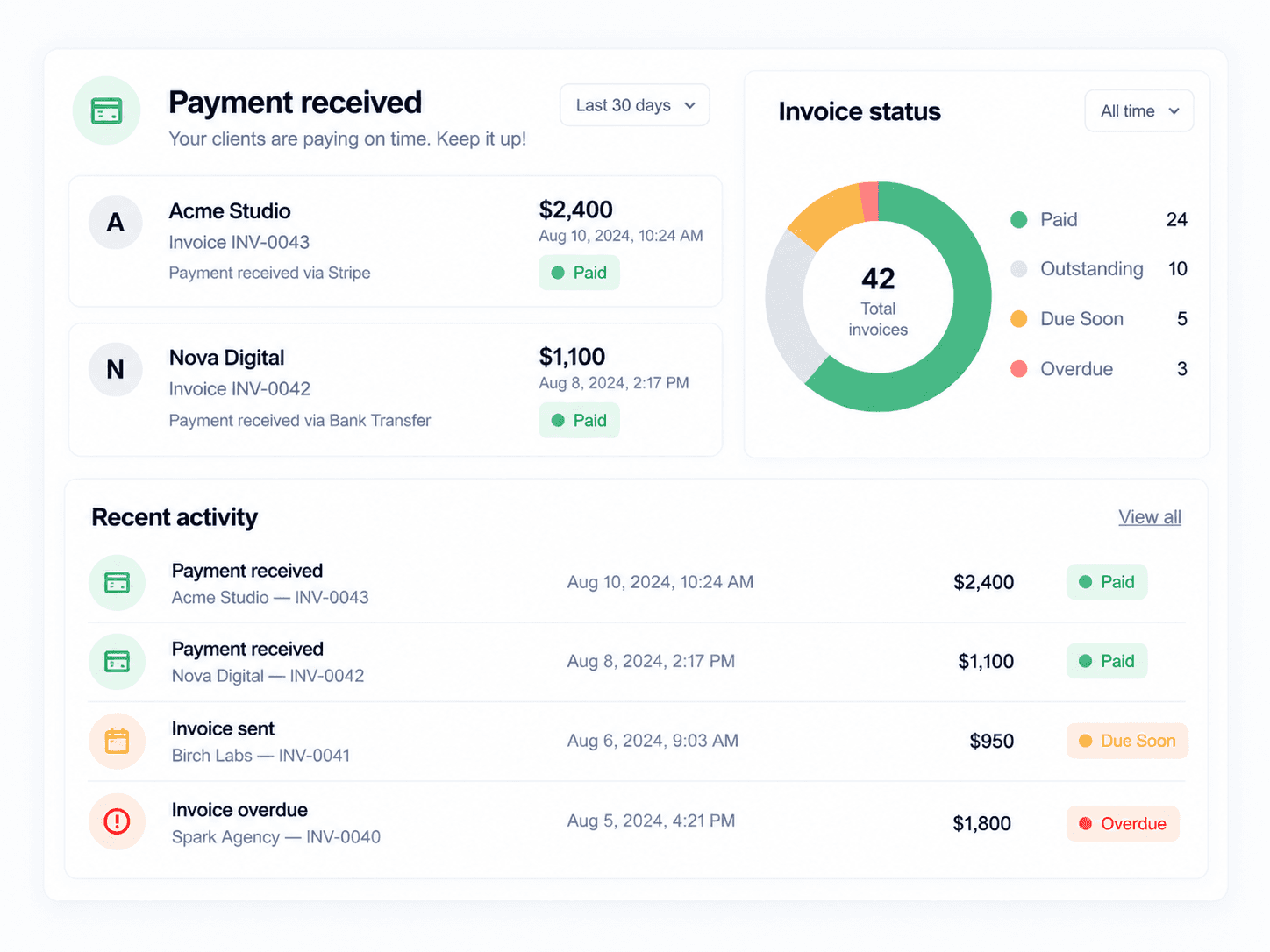
Your receivables, at a glance.

See what’s collected, outstanding, due soon, and overdue without rebuilding another spreadsheet.

Your receivables, at a glance.

See what’s collected, outstanding, due soon, and overdue without rebuilding another spreadsheet.

Follow-ups that happen on time.

Set the timing once. Invoxa keeps unpaid invoices moving without putting another reminder on your calendar.

Follow-ups that happen on time.

Set the timing once. Invoxa keeps unpaid invoices moving without putting another reminder on your calendar.

Scheduled Reminders

Send follow-ups automatically at the right time.

Due-Date Follow-ups

Keep upcoming payments from slipping through.

Overdue Notices

Follow up consistently when an invoice runs late.

See

See

what’s

what’s

Track incoming payments, outstanding balances, and overdue invoices from one clear view.

Choose what fits the way you bill.

Start with the essentials and move up when your workflow needs more.

Choose what fits the way you bill.

Start with the essentials and move up when your workflow needs more.

Monthly

Yearly

Standard

For solo professionals managing their own billing.

$19

/mo

Start free

Unlimited invoices

Payment tracking

Automated reminders

Basic cash flow reporting

Pro

Popular

For growing teams managing more clients and payments.

$49

/mo

Get Pro

Everything in Standard

Team access

Advanced reminder workflows

Custom invoice branding

Advanced cash flow reports

Scale

For businesses with larger billing operations and custom needs.

Custom

Talk to sales

Everything in Pro

Unlimited team members

Dedicated onboarding

SSO & audit logs

Priority support

Monthly

Yearly

Standard

For solo professionals managing their own billing.

$19

/mo

Start free

Unlimited invoices

Payment tracking

Automated reminders

Basic cash flow reporting

Pro

Popular

For growing teams managing more clients and payments.

$49

/mo

Get Pro

Everything in Standard

Team access

Advanced reminder workflows

Custom invoice branding

Advanced cash flow reports

Scale

For businesses with larger billing operations and custom needs.

Custom

Talk to sales

Everything in Pro

Unlimited team members

Dedicated onboarding

SSO & audit logs

Priority support

Less admin. More certainty.

A clearer billing workflow gives you more time to work and fewer loose ends to manage.

A clearer billing workflow gives you more time to work and fewer loose ends to manage.

Less admin. More certainty.

01

Spend less time on admin

Routine billing work stops taking over your day.

02

Catch problems earlier

See overdue balances before they disappear into the background.

03

Keep billing organized

Invoices and payment history stay connected to the right client.

04

Know where things stand

Get the answer without checking multiple tools.

A few things worth knowing.

A few things worth knowing.

Everything you need to know before getting started.

Everything you need to know before getting started.

Can I automate payment reminders?

Yes. Set reminder timing once and Invoxa handles the follow-ups automatically.

Can I see which invoices need attention?

Yes. Your dashboard highlights due, overdue, outstanding, and paid invoices in one place.

Can I manage multiple clients?

Yes. Keep invoices, payment history, and follow-ups organized for every client.

Can I customize reminder timing?

Yes. Choose when reminders are sent before and after an invoice is due.

Can I track cash flow from the dashboard?

Yes. Monitor collected, outstanding, due-soon, and overdue balances from one clear view.

Get paid.
Stay focused.

Invoices, reminders, and payments all in one place.

Invoices, reminders, and payments all in one place.

Create a free website with Framer, the website builder loved by startups, designers and agencies.